For the complete documentation index, see llms.txt. Markdown versions of all docs pages are available by appending .md to any docs URL.
OIDC browser authentication
Enable browser-based OpenID Connect authentication with encrypted session cookies.
Attaches to:
Note
Agentgateway supports more than one configuration style. Where a feature can also be configured in the simplified llm or mcp modes, the examples on this page show each option in tabs. For more information, see Routing-based configuration.
OIDC browser authentication provides built-in OpenID Connect login for browser-based clients. By default, unauthenticated browser navigation requests are redirected to the identity provider’s login page, and unauthenticated fetch requests receive a 401 Unauthorized response. Additionally, you can send browser navigation requests to a local login page before the identity provider flow starts, and add a local logout endpoint that clears the gateway session. After successful authentication, the user’s session is maintained with encrypted cookies. To let non-browser clients call the same routes, the policy can also accept bearer tokens.
The OIDC policy uses the OAuth 2.0 Authorization Code Flow with PKCE (Proof Key for Code Exchange) for secure browser-based authentication without requiring a separate proxy like oauth2-proxy.
About
The following diagram shows the OIDC browser authentication flow between the browser, agentgateway, and identity provider.
    sequenceDiagram
    autonumber
    participant Browser
    participant AGW as Agentgateway
    participant IdP as Identity Provider

    Browser->>AGW: Request protected resource
    AGW->>AGW: No valid session cookie found
    AGW->>Browser: 302 Redirect to IdP login<br/>(with PKCE code_challenge)
    Browser->>IdP: Follow redirect to login page
    IdP->>Browser: Display login form
    Browser->>IdP: Submit credentials
    IdP->>Browser: 302 Redirect to redirectURI<br/>(with authorization code)
    Browser->>AGW: GET /oauth/callback?code=...
    AGW->>IdP: Exchange code for ID token<br/>(with PKCE code_verifier)
    IdP->>AGW: Return ID token
    AGW->>AGW: Validate ID token with JWKS
    AGW->>Browser: Set encrypted session cookie<br/>and redirect to original resource
    Browser->>AGW: Request with session cookie
    AGW->>AGW: Decrypt and validate cookie
    AGW->>Browser: Return protected resource
- Steps 1-3: Unauthenticated request. When a browser navigation arrives without a valid session cookie, the gateway redirects the user to the identity provider’s login page.
- Steps 4-6: Login. The user authenticates with the identity provider.
- Steps 7-8: Callback. After login, the identity provider redirects back to the
redirectURIwith an authorization code. - Steps 9-11: Token exchange. The gateway exchanges the authorization code for an ID token using PKCE.
- Steps 12-15: Session cookie. The gateway sets an encrypted session cookie containing the ID token claims. Subsequent requests use this cookie.
Navigation and fetch requests
The gateway reads the Sec-Fetch-Mode request header that browsers send to tell a page navigation apart from a script request.
- Requests with
Sec-Fetch-Modeset tocors,no-cors,same-origin, orwebsocket, such asfetch()calls, receive401 Unauthorizedinstead of a redirect to the identity provider. - If you set
login.redirect, the401response also includes aLocationheader with that page, so that your application can send the user there. For more information, see Custom login page and logout. - Requests without a
Sec-Fetch-Modeheader, such ascurlrequests, are treated as navigation requests and redirected.
The permissive value of the credentials field changes these rules. Unauthenticated requests that are not navigations continue to the next policies instead of receiving a 401 response. A request without a Sec-Fetch-Mode header counts as a navigation only when its Accept header includes text/html. For more information, see Bearer tokens for API clients.
Session cookies
Review the following details about session cookies.
- Session cookies are encrypted and tamper-proof.
- Session cookie payloads are compressed only when the result is smaller. Compression helps ID tokens with large claim sets fit in browser cookie limits.
- Session cookies written before compression continue to decode.
- A protected response can include its own cookies and the OIDC session cookie.
- The gateway always requests the
openidscope to obtain an ID token. - A session cookie lasts 7 days by default. To change the lifetime, set
sessionTtlto a duration such as12h. The session never outlives the expiry of the ID token. - If the identity provider returns a refresh token, a separate encrypted cookie stores it. The browser session refreshes when the ID token expires. Add the
offline_accessscope when your provider requires that scope to issue refresh tokens. - The refresh response must include a new ID token for the same
subclaim. If the provider omits the ID token, the user must sign in again. If the provider returns an ID token for a different subject, the user must sign in again. - The gateway uses PKCE automatically to protect against authorization code interception.
Configuration
Add the oidc policy to a route to protect it with browser-based OIDC authentication.
Agentgateway requires the OIDC_COOKIE_SECRET environment variable to encrypt session cookies when an oidc policy is configured. Set it to a random value before you start the gateway, such as in the following example.
export OIDC_COOKIE_SECRET="$(python3 -c 'import os; print(os.urandom(32).hex())')"You can configure the oidc policy in the UI or in your configuration file.
The following steps add the same oidc policy as the Simplified (LLM) example in the Config file tab.
Create a configuration with an LLM model, but no OIDC policy. You add the policy in the UI.
# yaml-language-server: $schema=https://agentgateway.dev/schema/config
llm:
  models:
  - name: "*"
    provider: openAI
    params:
      apiKey: "$OPENAI_API_KEY"
Start agentgateway with this configuration, in a shell where
OIDC_COOKIE_SECRETis set. Otherwise, the save fails with anOIDC_COOKIE_SECRET is requirederror.Open http://localhost:15000/ui/llm/policies (LLM > Policies), and click the OIDC tile.
In the Provider section, fill out the following fields.
- In the Issuer suggestions, click Keycloak. The UI fills in
http://localhost:7080/realms/{realm}. Replace{realm}withagentgateway. - Keep Discovery for the Provider metadata, and keep the default Discovery override of None.
- In the Issuer suggestions, click Keycloak. The UI fills in
In the Client section, enter the following values.
- Client ID:
agentgateway-browser - Client secret:
agentgateway-secret - Redirect URI:
http://localhost:3000/oauth/callback
- Client ID:
In the Scopes section, click the
profileandemailsuggestions.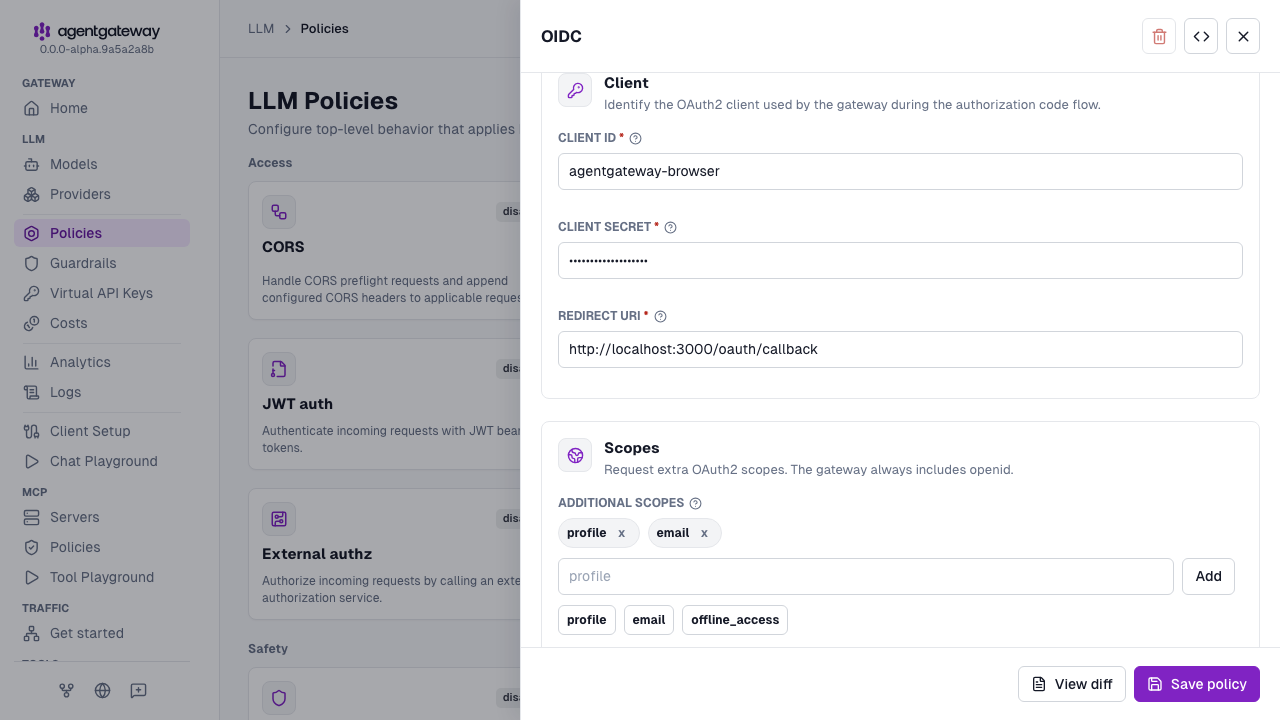
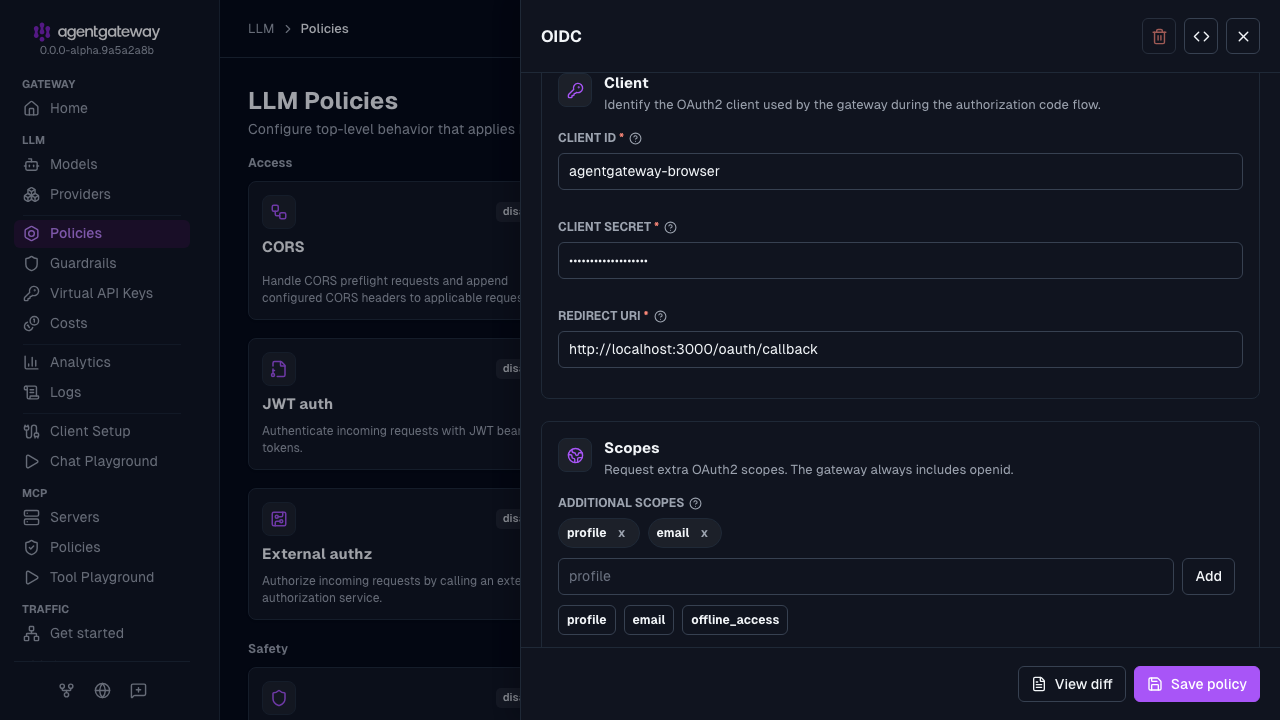
Click Save policy. The identity provider must be running, because agentgateway fetches the discovery document when it loads the policy. If the issuer is unreachable, the save fails with a
failed to decode oidc discovery responseerror.
The UI writes the client secret to the configuration as plain text, the same as the Config file tab. You can also add an OIDC policy in the Route policies section of a route in Traffic > Routes. The MCP > Policies page does not list the OIDC policy, so use the Config file tab for the Simplified (MCP) example.
Whether the UI can save depends on your storage mode. For more information, see Save changes from the UI.
Keycloak example
Review the following example for a Keycloak IdP.
# yaml-language-server: $schema=https://agentgateway.dev/schema/config
llm:
  policies:
    oidc:
      issuer: http://keycloak.example.com/realms/myrealm
      clientId: agentgateway-browser
      clientSecret: my-client-secret
      redirectURI: http://localhost:3000/oauth/callback
      scopes:
      - profile
      - email
  models:
  - name: "*"
    provider: openAI
    params:
apiKey: "$OPENAI_API_KEY"Custom login page and logout
Use login to show your application’s sign-in page before the identity provider flow, and logout to add a sign-out control that clears the gateway session. You can configure either block independently. The following example enables both; see Fields for defaults and path requirements.
policies:
  oidc:
    issuer: http://localhost:7080/realms/agentgateway
    clientId: agentgateway-browser
    clientSecret: agentgateway-secret
    redirectURI: http://localhost:3000/oauth/callback
    login:
      path: /auth/login
      redirect: /login
    logout:
      path: /auth/logout
      redirect: /login
For this example, serve /login and its assets on public routes that bypass OIDC. On that page, link to /auth/login and preserve the returnTo query parameter. For example, /login?returnTo=%2Fapp uses /auth/login?returnTo=%2Fapp as its sign-in link.
Use a same-origin POST form for logout, such as the following example.
<form method="post" action="/auth/logout">
  <button type="submit">Sign out</button>
</form>
Important
Make the logout destination public through a route or a policy that bypasses OIDC. If the destination is protected, the next request starts a new login. The user’s identity provider session is still active, so the user can be signed back in without a prompt and logout appears to do nothing.
Bearer tokens for API clients
By default, an OIDC policy accepts only the browser session that its login flow creates. Set the credentials field to let non-browser clients, such as a CLI or a script, call the same routes. Use one of the following values.
| Value | Behavior |
|---|---|
session | Default, except for ui.policies.oidc. The policy accepts only browser sessions. An Authorization header is ignored. |
sessionOrBearer | Default for ui.policies.oidc. The policy also accepts an ID token from its own identity provider in the Authorization: Bearer <token> header. An invalid bearer token is rejected with 401 Unauthorized. |
permissive | Like sessionOrBearer, but requests that the OIDC policy cannot authenticate continue to the next policies, unless they are browser navigations. Use this value when API clients authenticate with another policy, such as jwtAuth or mcpAuthentication. |
Accept ID tokens from the OIDC provider
Use sessionOrBearer when your API clients can get an ID token from the same identity provider and client as your browser users.
Add
credentials: sessionOrBearerto theoidcpolicy.policies: oidc: issuer: http://localhost:7080/realms/agentgateway clientId: agentgateway-browser clientSecret: agentgateway-secret redirectURI: http://localhost:3000/oauth/callback credentials: sessionOrBearerGet an ID token for the
clientIdfrom your identity provider, and send the token in theAuthorizationheader. The policy checks the token signature against its JWKS, and checks that the token is not expired. Theissclaim must matchissuerand theaudclaim must includeclientId. Access tokens usually have a different audience, so send the ID token, not an access token.curl -i http://localhost:3000/ -H "Authorization: Bearer $ID_TOKEN"
The policy handles each request according to its Authorization header.
| Request | Behavior |
|---|---|
| Valid token | The request is authenticated without the browser login flow. The token claims are available as jwt in authorization rules and access logs, as they are for a browser session. The gateway removes the Authorization header before it forwards the request. |
| Invalid token | The request gets a 401 Unauthorized response, even if it also carries a valid session cookie. The gateway does not redirect the request to log in. |
No Authorization header | The request uses the browser session flow. |
Any request to the login.path endpoint | The policy ignores the Authorization header. |
Pass API clients to other authentication policies
Use permissive when browsers log in with OIDC, but API clients use other credentials. Examples are tokens from another issuer, API keys, and MCP authentication. In permissive mode, the OIDC policy handles requests as follows.
- A browser session or a valid ID token authenticates the request, as with
sessionOrBearer. - An invalid or unrecognized bearer token is not rejected. The policy leaves the
Authorizationheader in place for a later policy to validate. - A browser navigation without a session starts the login flow, as with the other values. A request is a navigation when its
Sec-Fetch-Modeheader isnavigate. If the request has noSec-Fetch-Modeheader, theAcceptheader decides: a request that acceptstext/htmlis a navigation. - Any other request without a session continues to the next policies unauthenticated. The OIDC policy does not send a
401response, socurlrequests without anAccept: text/htmlheader are not redirected to log in.
Warning
The permissive value does not reject unauthenticated requests by itself. Add an authorization policy or another policy that rejects them. Otherwise, a request without credentials reaches your backend.
The following example accepts browser sessions through OIDC and CLI tokens from a second issuer through jwtAuth. The jwtAuth policy uses its default optional mode, which validates a token when one is present. The authorization rule rejects requests that neither policy authenticated with a 403 Forbidden response.
policies:
  oidc:
    issuer: http://localhost:7080/realms/agentgateway
    clientId: agentgateway-browser
    clientSecret: agentgateway-secret
    redirectURI: http://localhost:3000/oauth/callback
    credentials: permissive
  jwtAuth:
    issuer: https://cli.example.com
    audiences: [my-app-cli]
    jwks:
      url: https://cli.example.com/.well-known/jwks.json
  authorization:
    rules:
    - allow: has(jwt.sub)
Fields
Review the following table to understand this configuration.All login and logout endpoint and redirect values must be safe local paths. The built-in UI manages its own /ui/login, /api/auth/login, and /api/auth/logout endpoints and rejects login or logout under ui.policies.oidc.
| Field | Required | Description |
|---|---|---|
issuer | Yes | OIDC provider issuer URL. Used for discovery and ID token validation. |
clientId | Yes | OAuth2 client identifier registered with your identity provider. |
clientSecret | Yes | OAuth2 client secret for token exchange. |
redirectURI | Yes | Absolute callback URI handled by the gateway, such as http://localhost:3000/oauth/callback. |
scopes | No | Additional OAuth2 scopes to request. openid is always included automatically. Add offline_access when your identity provider requires that scope to issue refresh tokens. Returned refresh tokens are used automatically. |
discovery | No | Override the OIDC discovery document location. If omitted, uses ${issuer}/.well-known/openid-configuration. |
authorizationEndpoint | No | Explicit authorization endpoint. Overrides the value from discovery. |
tokenEndpoint | No | Explicit token endpoint. Overrides the value from discovery. |
tokenEndpointAuth | No | Client authentication method for the token endpoint. Discovery mode derives this from provider metadata. Explicit mode defaults to clientSecretBasic. |
jwks | No | JWKS source for ID token validation. If omitted, uses the jwks_uri from discovery. |
credentials | No | Credentials that the policy accepts: session, sessionOrBearer, or permissive. Defaults to session, or to sessionOrBearer for ui.policies.oidc. For the behavior of each value, see Bearer tokens for API clients. |
sessionTtl | No | Lifetime of the browser session cookie, as a duration such as 12h. Defaults to 7 days. The effective expiry is capped at the exp claim of the ID token. |
login | No | Optional explicit login endpoint and pre-login redirect block. Omit to keep automatic redirects to the identity provider. |
login.path | Yes, when login is set | Endpoint that starts the OIDC flow, handled by the policy without forwarding to your application. The configured path must have no query string and differ from logout.path and the callback path. Requests can include returnTo to select the destination after login; missing or unsafe values default to /. |
login.redirect | No | Application page shown before authentication, separate from the callback and the destination after login. Serve it and its assets on public routes; this setting does not make them public. Must differ from the login, logout, and callback paths. The gateway appends returnTo with the original path and query. Omit to start the identity provider flow directly. For fetch behavior, see Navigation and fetch requests. |
logout | No | Optional local logout endpoint block. Omit to disable local logout. Does not sign the user out of the identity provider or revoke tokens. |
logout.path | Yes, when logout is set | Endpoint that clears the policy’s session and login transaction cookies. Requires a POST request with an Origin header matching the origin of redirectURI. The configured path must have no query string and differ from login.path and the callback path. |
logout.redirect | No | Local destination for the 303 redirect after logout. Defaults to login.redirect when set, or / when login.redirect is omitted. Make this destination public, or the next request starts a new login. |
Access log enrichment
After setting up OIDC browser authentication, you can use JWT claims from the OIDC session in access logs. Add a frontend policy such as the following example.
frontendPolicies:
  accessLog:
    add:
      user.id: jwt.sub
      user.email: jwt.email
Learn more
- Keycloak integration
- Auth0 integration
- MCP authentication for MCP-specific OAuth flows